Tabular review
Compare many documents side by side in a spreadsheet. Define the columns once, Parachute fills in the answers.
Some questions only come into focus when you line up a stack of documents side by side. The key dates across twenty leases. The governing law in every NDA from last quarter. The termination clauses that don’t match your standard. Doing that by opening files one at a time is the kind of work that makes people dread Monday.
Tabular review turns the stack into a spreadsheet.
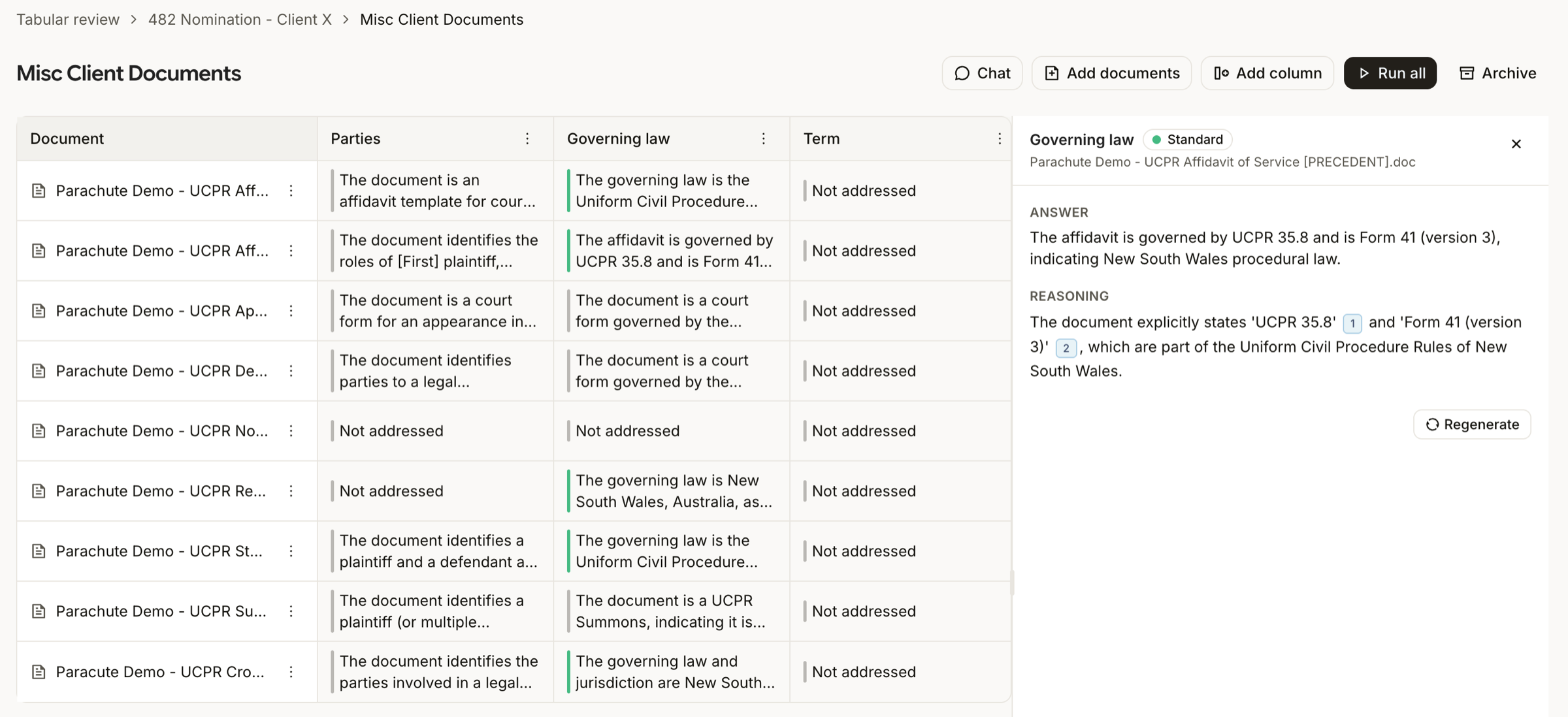
Documents as rows, columns as questions
A review is built from three parts:
- Documents are the rows. Upload them or pull them in from anywhere else you’ve used them in Parachute.
- Columns are the questions. “What’s the effective date?”, “Who are the named parties?”, “Is there a unilateral right to terminate?”
- Cells are the answers. Parachute runs each column against each document in parallel and writes the result, with a reasoning trail and citations, into the cell.
Every cell also carries a flag, green, yellow, red, or grey, so you can scan the grid for the bits that need a closer look.
Templates and prompt suggestions
Skip the typing. Start a review from a template like “Standard contract review” and the common columns are already there. Need a column we haven’t pre-built? Give it a name and a format, hit Suggest prompt, and Parachute writes the extraction prompt for you.
Columns can be free text, bulleted lists, numbers, dates, monetary amounts, yes/no, or a tag from a fixed list you define. The format keeps the answer shaped to the question, so the grid renders cleanly.
Chat with the whole review
Tabular review has a chat panel that’s grounded in two layers: the grid itself, so it can answer comparative questions across documents without re-reading anything, and the full text of the underlying documents, so it can still answer questions your columns don’t cover.
Useful for the things you didn’t think to add as a column. “Which of these have a notice period under 30 days?”, the grid answers it. “What’s the indemnification approach across these contracts?”, the chat reads the documents and tells you.
Attach to a matter
Reviews can be linked to a matter, so any documents you upload appear on the matter page and the AI has the full case context when you chat. When a review is finished, archive it from the header. The underlying documents stay accessible everywhere else they’re attached.