Tabular review
Compare many documents side by side in a spreadsheet. Define the columns - key dates, parties, governing law - and Parachute fills every row.
Draft documents, review contracts, manage your firm's knowledge, and deliver work to clients. All in one calm space.

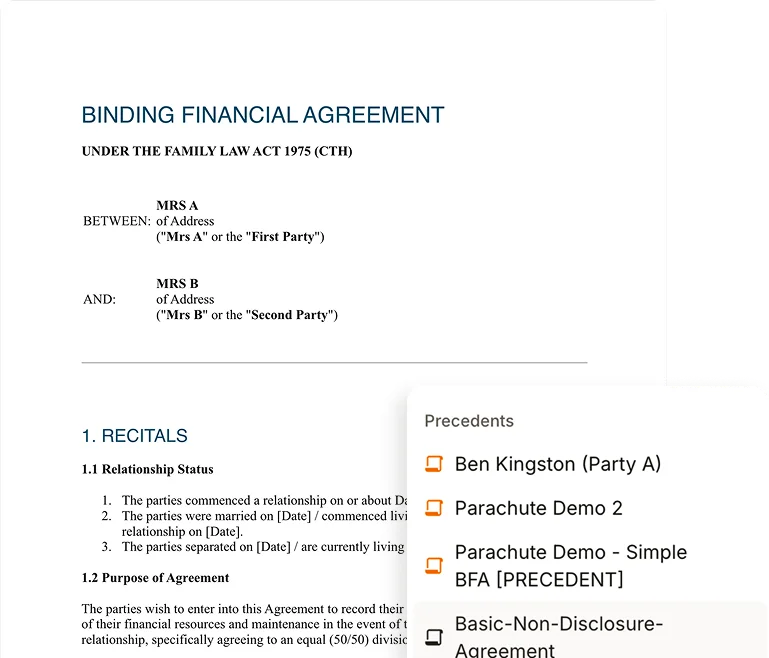
Generate legal documents in minutes. Parachute uses your firm's industry, jurisdictions, and knowledge base to produce drafts that already sound like you.
Multi-stage deep analysis that goes beyond surface checks. Parachute identifies obligations, flags conflicts against your knowledge base, and scores risks by severity.
Upload precedents, policies, templates, and company information. Parachute uses this context for drafting and review so the AI answers sound like your firm, not a generic template.
The everyday workflow tools that turn Parachute from a draft helper into the workspace your firm runs on.

Compare many documents side by side in a spreadsheet. Define the columns - key dates, parties, governing law - and Parachute fills every row.
Upload your firm's precedents - NDAs, retainers, leases - and Parachute drafts from your house style instead of a blank page.
Ask about Australian legislation and Parachute grounds its answer in the actual act and section, with a link to the source.
Every answer shows its sources, so you can trace a claim back to the document, legislation, or research it came from.
Paralegal, Lawyer, and Senior Associate. Pick the right depth for the task, or let Auto decide.
Forward emails to your unique Parachute inbox and they become AI-powered threads instantly. Attachments come through too.
Organise legal work into Business, Regulatory, HR, and Corporate Affairs. Create your own custom workstreams.
Group related threads, files, and conversations under a single matter. Stay organised by client or project.
Export to DOCX with your firm's letterhead, track changes, and comments preserved.
Paste a Zoom, Teams, or Google Meet link and Parachute joins as a bot. Get structured notes with summaries, decisions, and action items.
Invite clients, manage engagements, and become the expert verification layer for their legal work.
Full formatting, track changes, threaded comments, version history, and export to DOCX and PDF.
Request human sign-off on any document. A qualified professional reviews and returns it with inline comments and suggestions.
Sync matters from Clio and Smokeball. Work with documents in NetDocuments. Order from InfoTrack. Draft inside Word. No replatforming required.
Access and work with documents stored in NetDocuments.

Connect your Clio Manage practice data with Parachute.

Sync matters, contacts, and documents from Smokeball.

Search and order from InfoTrack within Parachute.
Draft and review documents directly inside Word.

Access and work with documents stored in OneDrive.
Parachute includes AI document drafting, automated contract review with multi-stage deep analysis, tabular review for comparing many documents at once, source citations on AI answers, Australian legislation lookup, a real-time collaborative editor, knowledge base management (global and organisation-specific) with firm precedents, expert verification, three AI modes (Paralegal, Lawyer, Senior Associate), matters for organising work by client or project, branded Word export with track changes and comments, meeting notetaker for Zoom/Teams/Google Meet, Microsoft Word add-in, email to thread with attachments, workstreams, and DOCX/PDF export.
Describe what you need or choose from 100+ templates. Parachute's AI generates tailored documents using your organisation's industry, jurisdictions, and knowledge base. You can iterate with AI to refine specific sections, and collaborate with your team using comments, tagging, and version history.
Upload any contract and Parachute runs a multi-stage deep analysis. It identifies obligations for all parties, detects conflicts with your knowledge base, scores risks by severity (High, Medium, Low), and provides suggested edits. You can apply changes directly and generate redlines.
Yes, with tabular review. Define the columns you care about - key dates, parties, governing law, or a specific clause - and Parachute fills in a row for each document, so you can compare a stack of contracts side by side in a spreadsheet instead of opening them one at a time.
Parachute keeps your legal sources in one place. Your knowledge base holds reference material like policies, playbooks, prior advice, and company information. Your precedents are the documents Parachute drafts from, such as NDAs, retainers, and leases. Parachute also draws on Australian legislation and a global knowledge base of regulatory guidance curated by Parachute. Upload files as PDF, DOCX, TXT, or URLs, and the AI uses all of it as context when drafting and reviewing, so its output reflects your firm's house style and the law that applies.
Yes. AI responses show their citations, so you can trace each point back to the document, legislation, or research it came from instead of taking it on trust. You can also follow Parachute's reasoning as a response comes together.
Yes. Parachute connects to practice management and document systems including NetDocuments, Clio, Smokeball, and InfoTrack, plus OneDrive, Microsoft Word, and Slack. Connect your account to bring matters, contacts, and documents into Parachute and save finished work back. See the integrations page for the full list of what's live and what's coming soon.
Request expert verification on any document and it routes to your connected law firm or the Parachute expert network. A qualified professional reviews your document in a collaborative editor with inline comments, suggestions, and real-time chat. Pricing is shown upfront and turnaround is typically within 3 business days.
Book a demo and we'll walk you through Parachute end-to-end, then get you set up on the platform.